Tuesday, March 28, 2017

Cheapest Brushed Tricopter Ever? [overview]

Here's adding to the family of brushed, popsicle-frame based micro-copters: a tricopter!

The first part of a detailed build is available here. This post is mostly an overview of the parts used as well as some sample flights.


Part list:

- Eachine Naze32 Brushed FC ($7): note that newer ones like the F3 will not work. (Or at least not as easy)
- DasMikro FlySky Receiver ($10): version B, for PPM output on CH8.
- Eachine 8520 Motors ($12): I'm really interested to try the RacerStar or Chao-Li ones to see if I can get a bit more oomph out of them, as currently its a bit anemic even with ladybird props. Maybe 2s?? :P
- Ladybird 55mm props ($8): works great now for the quadcopter. Have some 65mm King Kongs on way which hopefully provides more power and are considerably cheaper at $5 for 10 pairs intead of $8. There are less clearance issues on the tri compared to the quad.
- 3.7g servo ($2.50): could have gone lighter, but was the cheapest I could find on AliExpress at $2.50. The Emax 2.5g should work too (and may be better quality) but is a whopping $5!
- 1x rubber grommet ($1.50) for ghetto-mounting the tail motor to servo horn
- 3x "craft grade" popsicle sticks from the dollar store
- Prop guards ($2.30)
- Elastic bands

AUW is about 50 grams before camera.

Total was a bit over $40 without FPV stuff, with a lot of spare props and grommets, plus an extra motor (Since the tail servo handles all the yaw and the number of motors are odd anyway, the third motor can be any direction). Not super cheap compared to RTF quads available on the market these days, but I'm not aware of a tri in this price range, and it was a pretty fun build process! I would love to hear how one might go cheaper on this if anyone has any ideas! :) I expect 720 motors could work, but the cost savings would be negligible. Oh and I forgot to include the price of the battery, which was from my V222 quad...

Using FlySky i6 receiver with 10-ch mod. (swich off AFHDS 2A to bind).

Indoor flight:


Outdoor flight:


While not as anemic as the initial popsicle quad with the weak triblades, its definitely could do with some more power. Hopefully the 65mm props in the mail would help. I should also consider removing the prop guards as they add a tiny bit of weight, and also see if getting different batteries would help. (These are from a unbranded multi-pack I got for my V222, and there's no discharge rating on them. Have some 600mAh 25C's coming, so will see if the battery may be the limiting factor here...)

*update* the 65mm props have arrived, and there's a lot more thrust now! Check it out:


And some flight footage:


*update2*: Yet another outdoor video with the 65mm props:


This time I had a larger area to play in and was able to fly a bit harder. It flew well generally, but I'm finding that the props are a bit loose and pop out relatively easily (this could have been after an incident where I crashed it indoors while tuning perhaps)... by the end of the second pack, I had lost the tail prop in flight and crashed it such that one of the main popsicle sticks have unglued... luckily all electronics appear to be intact. back to the workbench!


Bonus pic the happy DIY multicoper family (so far):


Thursday, March 02, 2017

Popsicle Quad, V2

So after the first version, made with HaagenDaz sticks flew a bit, I wanted to make some upgrades. Specifically, I wanted a.)more power and b.) a bit more clearance to mount an AIO FPV (all-in-one first-person-view) camera, such as the TX02 that I had on hand. To do so, alas, would require a slightly larger frame. So I picked up a bunch of "craft grade" popsicle sticks (there's only so much sugar we can handle) from the dollar store, and got to designing a new frame.

I wanted to keep on using the rubber grommets as before, which were quite good at holding the motors. The final design I came up with the following: (series of relatively self-explanatory photos)


The end result, with the old Eachine triblades:


The new props, based on the suggestion of a redditor, are the 55mm ladybird props. I also tried some hubsan x4 props which were also an improvement, but only had a set and broke them quickly testing indoors ;) I see some newer KingKong 55mm and 65mm props, which might also be good to try out. They are also a bit cheaper at $5usd for 10 pairs instead of ~$8 for 8!! The main thing is to use props with 1mm shaft holes, and to ensure there's enough clearance of course!


Looks like the props are about half a gram heavier each. The extra thrust however, was totally worth it. It's actually a bit hard to fly indoors without a prop guard, so I waited a while before good weather and opportunity arose. Here's a flight in a park taken with a run cam 2 (sorry for slanted camera placement... it's a bit hard to tell sometimes ;)


Unfortunately, I haven't had time to do any FPV flights with it, and my ghetto FPV system (to be described at some point) is quite clunky. The camera adds 10 lbs 5 grams, which is about 10% the total weight of the quad. Being 200mW it also draws about 400mW, which is not negligible for such small flight batteries. A 25mW (such as the TX01 or the switchable power TX03) transmitter would be more appropriate for this build.

Saturday, February 25, 2017

HäagenQuad Micro: a tiny quadcopter based on an ice cream stick frame

Since the weather is pretty unforgiving here in the wintertime, I wanted to build a small indoor micro-sized quadcopter but still keep the control systems that are present in the larger racing/acro machines.

Originally wanting to use a 3D printed frame for this build, but after having calibration and belt wear on the Y axis, I ended up with something a bit different while the replacement parts for the printer are yet to be installed. This attempt to use popsicle sticks for a quad frame is by no means the first, but unlike that example I'm using separate "DIY" quadcopter components (typically found on Eachine QX-series for those who want to just get a complete kit with all the parts). The advantage is you get a fully configurable flight controller that can run Beta/FleanFlight, but the tradeoff is you need an actual transmitter which increases the cost. I'm using the FlySky i6.


Everything is available from Banggood. For Canada I've found that using the registered + insured option gets the shipment faster, and may help alleviate issues as experienced by many. (For other Chinese retailers, the ePacket option is great as well)


Here's a complete list of parts along with their product links. (Prices may fluctuate due to sales etc). Note they are affiliate links which mean while its the same price as if you went on the site normally, purchases generate a very small commission for me. First time trying this feature out...

Motors/props ($11.25 USD): Eachine 820 Motor (4x) + Props kit (2 sets)

I'm guessing they're similar to the ChaoLi motors. They come in CW (red+ blue-) and CCW (white+ black+) wiring. While they might spin when polarity is reversed, from what I understand the brushes may wear out much more quickly so its best to make sure they're hooked up correctly!

If I was to order again, I might try the RacerStar ones, which may be better (or simply better looking with the nice red paint scheme... red means faster, right?? ;))

Flight Controller  ($7.05 USD): Eachine Naze32 Brushed Controller

In the racing multicopter community the Naze32 is starting to show its age, and F3/F4/F?? controllers with faster processors are starting to become the standard. While the latter are available for brushed builds, it's not really necessary for a small project like this. However, I've noticed that at least F3 based ones are only a few bucks more, so if I was to make another one, I'd probably go with those. One other option would be to go with a built in receiver, such as this one for FlySky, which would make the wiring and mounting a lot cleaner! The tradeoff of course is you won't be able to use the receiver by itself for another project... Similar options exist for DSM and FrSky

Receiver ($10 USD): DasMikro Ultra Mini

Select "Type B", which has the PPM out and makes wiring super easy. Also supports 8CH with a modded Flysky i6, so you can add extra switches and knobs if you like to additional AUX channels!


Rubber Grommets for motor mounting ($1.60 USD): 20 pack 

Make sure you select the 8mm version. Outer diameter is about 10mm, not counting the lips that stick out a bit further. 10mm an important dimension as that should be the size of the hole on the arms.

JST/losi Connectors:

Instead of the losi battery connector that came with the FC, I went with the 2.54 JST since I had a bunch of those lying around.

Others:

- 2x Häagen-Dazs ice cream sticks (other popsicle sticks may work, if the ends are wider than 10mm)

- Elastic Bands

- Bits of paper etc to stick under the FC to make it level with the frame, if needed

Build Process

The trickiest part of the build, for someone not familiar with woodworking is getting the right sized hole on the arms. At first I was ambitious and wanted to drill an enclosed hole, but quickly found out that it is very difficult to do so with a regular power drill. It turns out for delicate wood like this the best way to cut through is either with a small knife, or a really high RPM grinding tool (e.g. Dremel, etc) with the right attachment. Also in the end I found out that it's OK for the outside to be open as the grommet will still sit snugly in the opening, as follows:


The first thing I wired up was the FC to the radio. Since we're using PPM, we only need a single signal wire, as follows:


Then, we just have to connect up the motors to each channel. I soldered directly onto the FC, and the only thing you have to make sure is the right motor direction. For CleanFlight, the directions are:


So motors 1 and 4 are CW, while 2 and 3 are CCW. The Red+/Blue- wired motors are CW, while the White+/Black- are CCW, respectively. So we just have to solder each motor to the correct pins on the FC:


I skipped a few photos along the way, but here's what it looks like all hooked up:


The battery get strapped in underneath, using the same elastic that holds the FC in place. Not the most secure mount, but it works!

Here's the AUW of everything:


At almost 50 grams, it is interesting to see that there are many brushless builds these days that are around similar weight. Exciting times we live in! Anyway... how does it fly?


Turns out, not very well! After some discussion online, people have recommended me to move away from the triblade props that come with the eachine motors. While they are super quiet, there isn't a lot of power. I have some ladybird props on the way which should make a difference. Stay tuned!

Here's an updated outdoor video using the new ladybirds. As you can see it actually manages to get off the ground (and clips a tree at one point and still recovers...)


Other Potential Changes

I haven't decided if I should switch everything to losi since they're much easier to plug/unplug compared to JST. On the other hand I have 5 batteries with JST already and it would take quite a bit of soldering to change them...

Finally, a family pic with a WlToys V222 (showing its age compared to modern toy quad options, but still a great intro to quadcopters), and the perpetually in-progress QAV250:


Bonus Peek:

Here's the next version, with larger and more powerful props (hubsan x4 shown, but also have ladyprops which feel even better), as well as an AIO video tx:


Tuesday, January 24, 2017

Harmochord restoration with a 3D printer (mostly Dad's work!)

In the summer of 2016, we stumbled across an interesting find at a pawn shop in Verdun:


It's basically an accordion with an electric pump instead of the manual bellows, designed as a table-top instrument! Single bank of reeds for the keyboard, and a relatively small array of bass notes compared to the full size accordions

After trying it out in the store and verifying that at least every key makes a sound, we decided it was worth the $20 and the effort to lug it back home on the bus (it probably weighs around $15kg or so...)

The things that were apparent immediately:

- It was "Made in West Germany", which makes it probably the most interesting instrument I have owned thus far...
- pump appears to work fine
- 3 black keys are missing
- a few of the bass notes would stick when pressed

Things we found out afterwards:

- The "briefcase" actually was supposed to contain 3 legs, which allows the instrument to be self standing. Those were missing as well. (oh well...)
- slight leakage in some of the bass notes, causing either weaker sounds or other tones when some notes were pressed

As a keyboard player, the first thing I wanted to do was to get replacements for the black keys. Never got around to it with busy school and family schedule, but when my dad stayed with us for a bit, he took on the project.

This is mostly a documentation of the result of his efforts!

Here's a close-up of the missing keys:


A 3D printed model was made in SketchUp:


It was a basic 2D profile that was pulled upwards, and then a small rectangular extrusion was added (top left of picture).

Here's the key being printed and the finished product:


Here are keys in their final location. Note that the key bed (not 100% sure if that's the right term here) isn't in the best of shape, so things aren't super aligned and some of the existing keys also aren't completely straight either.


Finally, a short demo of how it sounds:


There are a few more things that need to be fixed. My dad managed to get rid of the sticky behaviour of the bass notes, but the leakiness of some of the notes are still there. Here are some shots of the mechanism when it was open, for curiosity's sake:


So at some point, I might tackle that... (but there's also a good chance it won't happen until the next time Dad visits! ;)

Tuesday, October 25, 2016

Raspberry Pi Robot with PiShield, Part 3: Fast video streaming

I fiddled for a good part of the day trying to find a low-latency local network video streaming solution to implement a "FPV"-like control for the robot using a RPi camera module. It turns out a bunch of existing solutions (like VLC streaming etc) have really high latencies. This is OK for things like a security camera, but not so much for realtime control.

Finally, this rather hacky solution using netcat appeared to work best:

1. On the client (viewer/controller, running on a Mac) side, run:

 nc -l 5000 | mplayer -fps 30 -cache 1024 - -x 640 -y 360

 2. On the RPi side, run:

 raspivid -n -t 999999 -fps 12 -rot 180 -o - | nc IP_OF_VIEWER 5000

 netcat is used to listen and send; raspivid grabs the video and pipes it to netcat, and on the other side netcat pipes the received data and spits it into mplayer.

 This was the only way I could get less than 1s of latency on the video feed, although it still wasn't great. Having a good USB wifi dongle also helped a bit. Finally, changing the dimensions of the video using raspivid actually made it much slower, probably due to software resizing of each frame on the fly compared to just sending out the raw feed from the camera.

 Next steps: get some more interesting sensor info from the PiShield, and get a separate power source since there seem to be random system freezes when the motor and Pi are both running off the same power bank.

UPDATE Oct 26:

with the advice of a very helpful redditor who suggested gstreamer, I gave it a shot this evening.

On Raspbian, gstreamer1.0 is currently already in the official repos, so no need to add custom sources as these earlier instructions.

For OSX, I just downloaded and installed the latest compiled version from the official source. It also handily tells you that by default the path for the commands are at

/Library/Frameworks/GStreamer.framework/Commands/

From here, we can either have a tcpserver on the Pi that a client can connect to, in which case:

RPi:

raspivid -t 0 -h 720 -w 1080 -fps 25 -hf -b 2000000 -o - | gst-launch-1.0 -v fdsrc ! h264parse !  rtph264pay config-interval=1 pt=96 ! gdppay ! tcpserversink host=minibian.local port=5000

Mac (note explict path to gst-launch-1.0 command, since I haven't added it to path):

/Library/Frameworks/GStreamer.framework/Commands/gst-launch-1.0 -v tcpclientsrc host=IP_OF_RPi port=5000  ! gdpdepay !  rtph264depay ! avdec_h264 ! videoconvert ! osxvideosink sync=false

Now UDP would be faster, and in this case it would be similar to the netcat example where the RPi would define the UDP "sink" using the IP address and PORT of the viewer (on the Mac), which would yield the following:

RPi (note destination should be explicitly defined by the source this time):

raspivid -t 0 -h 720 -w 1080 -fps 25 -hf -b 2000000 -o - | gst-launch-1.0 -v fdsrc ! h264parse !  rtph264pay config-interval=1 pt=96 ! gdppay ! udpsink host=IP_OF_VIEWER port=5000

Mac:


/Library/Frameworks/GStreamer.framework/Commands/gst-launch-1.0 -v udpsrc port=5000  ! gdpdepay !  rtph264depay ! avdec_h264 ! videoconvert ! osxvideosink sync=false

Eye-balling the two versions, I feel like the UDP version is slightly snappier, but considering that my network is not very congested, I have a feeling the difference wouldn't be as much as if I had a lot of traffic running. Regardless, this is a HUGE improvement over the existing solution! Should try to do some timing tests to see if I could get a better measure of the actual latency - perhaps using a photo of a stopwatch like this guy did (which was one of many sources I originally consulted for the netcat solution above as well)!

finally, here's a test on the actual video latency of the setup above: looks like its somewhere between 150 and 200 ms.


FINAL UPDATE (Jan 2017)

Yet another option, is to use RPiCamWebInterface. In the end I didn't get around to do the latency measurement, but it feels *almost* as fast as the previous solution. The other bonus is the client user interface is far nicer!

Here's a sample video showing the stream in action:


Tuesday, October 18, 2016

Raspberry Pi Robot with PiShield, Part 2

The previous post showed the basic functionality of the Raspberry Pi Robot. The Arduino-based motor driver takes in commands to drive the robot in different directions, can be controlled remotely in a serial terminal via SSH using the screen application.

This is what the system looks like:


The Raspberry Pi talks to the Arduino via USB serial. The movement commands are sent from the Pi to the Arduino, currently, 'w', 's', 'a', 'd' to toggle movement, and ' ' (space) to stop. there are also ASCII numbers 1-6 that correspond to PWM values to control the speed of the motors. While it would be possible to control the motor driver with the GPIO pins of the RPi directly, I had that other circuit all hooked up from a previous project, and all it required was a single USB cable to the Pi, so I went with that instead of rewiring everything.

This time, we want to start doing something a bit more fun. Here's a preview of the end result:


The premise of the example is quite simple: get too close to the robot, and it runs away from you!

We use Python this time to implement the sensing behaviour. The source code that implements the above is available here. I call this one the PyPiBot as it runs on Python... ;)

Basically, what it does is the following:

Initialization:

1. Open SPI device for getting sensor data from the PiShield 
2. Open serial port (for sending commands to the motor driver)

Main loop:

1. Get data from sensor port
2. If sensor value is greater than a certain threshold trigger a move forward routine:
   - send a 'w' to the robot, which puts it in forward mode
   - wait a second (sleep)
   - send a ' ' to make it stop
3. Check for ctrl+c and quit the program

What you notice about this particular script is that it is blocking, which means that while the robot is in the move forward mode and the script sleeps, you can't respond to anything else. We'll tackle that in another example in the future!


Friday, October 14, 2016

Raspberry Pi Robot with PiShield, Part 1

Using the base from Tippy, I've started building a Raspberry Pi powered, sensor enabled robot. Currently, you can SSH into it and control it via the serial port. The original Arduino-based motor driver from Tippy is still there, but in theory we could just send out PWM and control signals from the Pi directly.

Main components:

- Raspberry Pi Zero with inline 2-port USB adapter:
- - Port 1: wifi dongle
- - Port 2: Arduino USB serial
- PiShield Sensor Interface (current Kickstart project here)
- 5000 mAh OCHO mobile power bank (1A and 2.1A outputs).
- Arduino and Sparkfun motor driver. Its been a few years since I ordered that part. This one has two channels with PWM input for each channel for speed control. There are now ones that fit directly on the Raspberry Pi as well which could be more convenient to use...
- Tamiya Track and wheel set. Really handy little platform for making a basic tracked robot. One of the cheapest options out there too.

My idea is to add sensors to the PiShield, and then have it react to local environment conditions in addition to receiving wireless commands. The software I'm running on the Pi is the latest minibian, which usually boots up and gets an IP from my router in about 10~15 seconds.

Could this have been done on an Arduino or even an ESP8266 based board? Sure - but its kinda neat to be able to run linux on-board in a relatively compact package. Stay tuned for more updates!

p.s. apologies to /r/cablemanagement. This part is clearly not my strong suit... ;)


Wednesday, October 05, 2016

5V power supply shootout

As I've got quite a few Raspberry Pi's in employed in various settings, one constant issue is finding the right power source for them. The Pi3, for example, is supposed to require up to 2.5A under heavy use (I presume a lot of wifi activity + fully loaded CPU/GPU, which is probably not likely to happen all the time). However, it's always good to know where the limits lie. I've been running a Model B on a wifi dongle + USB webcam as a streaming home surveillance system for a while now, on a "measly" 1A adapter without any issue (its a Nexus 4 charger, results below explain the quotes around the word "measly"...), which is probably living a bit dangerously perhaps... Anyway, here's some tests I did recently, along with lots of pictures to show for it!

First up, the test equipment. Here I'm testing a Nexus charger (1A), Samsung Tablet charger (2A), a 2.2A supply from Element14, and a cheap "2A" supply from a dealer on AliExpress. Near the top left are the key components for the test, which will be displayed in a larger image following this one:


Here are the interesting pieces of test equipment. On the left is a "USB charge doctor". They're available for a couple bucks on AliExpress. (e.g. link here.) There are a number of models out there at different prices, but their main feature is to be able to sit between a female USB outlet and a device connected by a male cable, and measures the voltage and current. Another cool feature of this particular one is it also has a resettable energy counter. This basically sums the amount of energy that has gone through, and is good at things like measuring how much capacity is left in your battery, or what the effective output capacity of a mobile power bank is. For example, on our aging Nexus 4, if I deplete the battery completely and charge it (system turned off), it measures about 1600mAh, which is quite a bit below its factory spec of 2100mAh. Our Nexus 5, much used but in newer condition with fewer cycles, reads about 2000mAh (out of 2300 new).


Plugged into the USB power meter, is a funny device with two large green resistors on it. This is a switchable dummy load that can be set to draw either 1A or 2A from the USB port it is connected to. Using basic Ohms law we can see that the resistors are most likely 5Ohms each, and the 1A mode just makes use of a single resistor (drawing 5V/5Ohms = 1A) while switching to the 2A mode, puts two in parallel (5V/2.5Ohms = 2A). There's also a handy two colour LED that lights up either green in 1A mode or red in 2A mode, assuming the power source doesn't crap out completely (see later tests).

The next funny device is a hacked microUSB female to female USB adapter. This is required in order to use the power meter with the chargers that have microUSB ports hardwired to them. Here are the chargers: Note that two of them are hardwired. I use a 1m Aukey microUSB cable so that they can be used with the same funky adapter (explained later). Aukey, along with UGreen, Anker, and a few other "respected" brands, provide quite high quality products from the AliExpress marketplace at a price that is a compromise between so-cheap-you're-surprised-they-even-work (and most often they don't) and arbitrarily-expensive-north-american-department-store levels.


Below shows the setup for the cellphone chargers. Since 

I could simply plug the USB power meter and dummy load directly into the charger (and is in fact what I'd normally do). However, I deliberately introduced the extra USB cable so that I could use my home-made adapter in between. This is because when I was making it, I realized that the wires of the USB extension cable I sacrificed, as well as the traces on the female microUSB adapter board was a bit on the thin side. If the resistance was significant, it may cause a noticeable voltage drop when using this adapter, and would have a negative impact on the observed performance of the charger. This way, any potential degradation would be consistent throughout all our tests. (The flip side of course means that I wouldn't be able to make a very convincing critique of the absolute performance, only how they measure up against each other....)


 So then, with a wired charger, this is what the setup looks like:


After that wall of text and pictures, lets finally get down to some results!!


Nexus 4 charger. 1A setting. 4.62V, 0.82A. Note the green light.

Nexus 4 charger, 2A setting. 3.94V, 1.37A. The power meter will probably crap out at some voltage threshold, but here we see its still kicking away, drawing way beyond its rated capacity...

Next we have the Samsung 2A charger. Here we see it at 4.6V, 0.83A for the 1A setting, and 4.53V, 1.65A for the 2A setting.


Onto the 2.2A rated charger from Element14: at 1A, it measures 4.83V at 0.9A


And at 2A, 4.5V and 1.65A


Finally, we have the cheapo 2A charger: even at 1A, the voltage drops down to 3.97V, and outputs a measly 0.7A


 And when trying to put a 2.5 Ohm load to draw 2Amps: .... uh oh.


Well, at least the red light gives off a feeble glow, showing that its at least trying. The voltage has dropped so low that the power meter no longer turns on. At some point I could easily verify this threshold on a variable power supply at some point...

Finally, just for fun, I got a 5000mAh Mediasonic Ocho power bank. It has a 1A and 2.1A port.

On the 1A port, I get 4.56V at 0.84A


Trying to draw 2 amps on the 1A port, we get a dropout. However, what you may barely make out in the picture below, is that the voltage is just on the threshold for the power meter to almost turn on. This suggests that its doing better than the cheap wallwart above!


On the 2A port, we have no trouble at least keeping things going. 4.27V @ 1.56A. Considering that these guys are supposed to at least register a "charging" status on power hungry tablets, its not surprising that it at least manages to chug along, even if the voltage dips quite a bit... for about $10cad from NCIX when on sale, these guys are an amazing deal.


So, there you have it! Here's all the info consolidated in one place:

Charger      Rated   1A             2A
Nexus 4      1A      4.62V 0.82A    3.94V 1.37A
Samsung      2A      4.60V 0.83A    4.53V 1.65A
Element14    2.2A    4.83V 0.90A    4.50V 1.65A
Cheap0       2A      3.97V 0.70A    N/A
Mediasonic   1A      4.56V 0.84A    N/A
Mediasonic   2.1A    4.64V 0.8A     4.27V 1.56A

Comments and final thoughts

The voltages across the board seems a bit on the low side. This is definitely related to the adapter I built. Due to the thin wiring of the cable and small traces, the adapter's resistance will create a.) a voltage drop and b.) reduce the amount of current (Ohms law here we go again...). As mentioned earlier, I wanted to get a sense of the relative performance of these chargers with respective to each other, and if I removed the adapter for the chargers that don't need it, it would skew the results quite a bit against the wired chargers.

I was especially interested in getting some sort of measurement of these wired chargers that I was especially interested in, as prior to the making of this adapter, I had no way at all of testing their performance in any way (other than to see if a Pi manages to boot and/or display the "low voltage rainbow square").  At the same time, I could unquestionably say that the cheap adapter is totally off in terms of rated performance, not even coming close to performing at its advertised values.

For a more definitive view on the absolute performance of these guys, I should probably look into building a microUSB adapter with beefier wiring to reduce the amount of losses through this part. It might also be good to actually compare the performance of the cheap USB power meter with a decent bench meter to see if there are any discrepancies there as well. 

As one last point - the cheap USB dummy load gets pretty HOT. I would not recommend it for any prolonged tests, and perhaps invest in a headsinked and actively cooled version at some point.

Tuesday, October 04, 2016

Kickstarter is Live!!!

I have a habit of back filling this blog, typically in a sneaky way such that when you visit, it looks like the content has been gradually updated over the years. However, currently due to PhD stuff, family/baby stuff, and various other things, I haven't managed to backfill adequately to get rid of the obvious gaps, so this post will look somewhat unexpected... but here goes: after starting this project about two years ago with Infusion Systems, the PiShield is finally live on Kickstarter!!


Wednesday, July 06, 2016

Jeux d’orgues on iPad with Yamaha CP33

Jeux d'orgues is a neat application that contains a number of French organ samples (link here). There's also an iOS version and Android version (called Opus 1). Using a class compliant USB-MIDI adapter or alternatively directly connecting to the USB-MIDI port, it is possible to play the instrument using external controllers.

Here we see it in action with my Yamaha CP-33. The neat thing is the app supports MIDI CC/PC mappings to trigger different stops, which means I can change them using the built in patch keys of the keyboard!


Friday, November 20, 2015

Lasercut MDF speaker enclosures

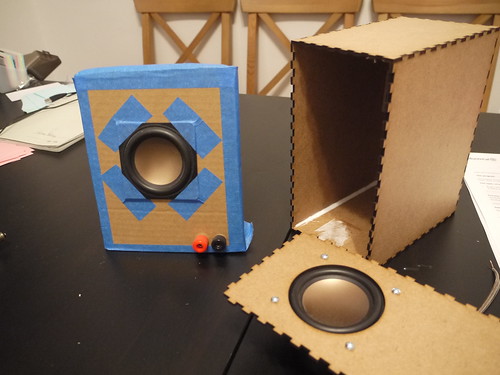
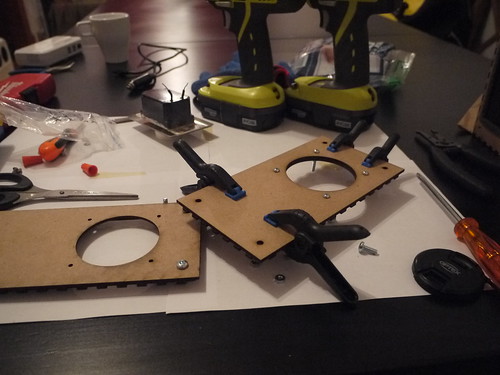
A fellow lab mate has been working on neat digital musical instrument design tools and making extensive use of a lasercutter for building prototypes. One thing I decided to try was using similar materials and techniques to quickly make speaker enclosures. I had a few HiVi B3S lying around, and have always wanted to make this design from zaph audio as a simple but good quality sounding kit. (confession: I totally skimped out on the crossover part). My attempt previously had worked, and while the little HiVi drivers gave out quite good sound, I can't help but the enclosures were holding the system back ;). So, armed with a relatively hassle way of quickly making very precise volume boxes together, I cobbled up a design using the handy makerbox.io tool and Inkscape. The former allows you generate finger joint designs of a specific dimension given a number of input parameters (the most important being the thickness of your material). Then I went into Inksscape and carved out the mounting holes and driver cutouts.

The project took two major iterations. First was making a perfectly sized box (according to zaph's design) with the driver and mounting cutouts, and then adjusting it due to issues encountered by the limitations of the materials used (i.e. very thin MDF).

P1050201
Old buildhack, showing the plastic box+cardboard baffle of the previous version and version 1 of the new design with single layer baffle


There were two main challenges I had with the new design, both relating to the baffle, or front surface where the driver is mounted:

1.) Because the 1/8" MDF is relatively thin, the baffle will actually bow forward a bit when the driver is mounted

2.) The finger joints are great at making an enclosed box, but once glued it is impossible to open it again without destroying the box. I didn't have the heart to simply glue everything together, and it's generally good to have your internal components accessible. Therefore, I had to come up with a removable baffle solution.

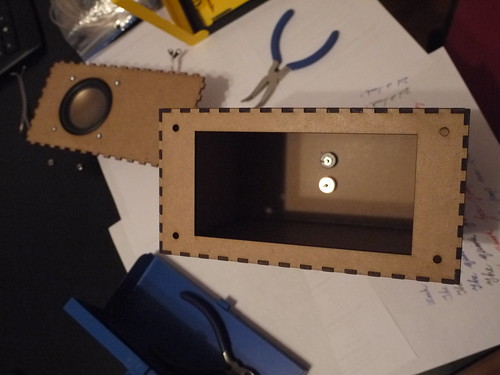
So, in the second iteration, I decided to double up on the front baffle (by simply gluing two pieces on top of each other), and then adding a non-removable component with a large hole like this:

P1050246

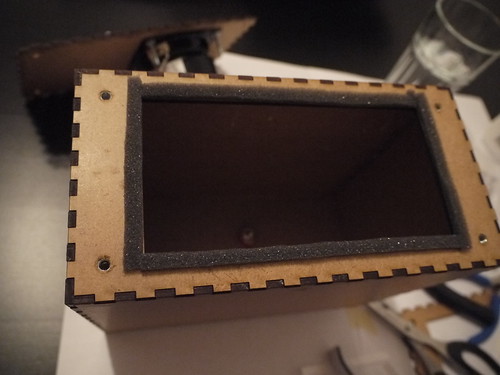
Then, I put some t-nuts underneath the holes, and lined some insulation foam (weatherstripping) for better seal:


P1050251

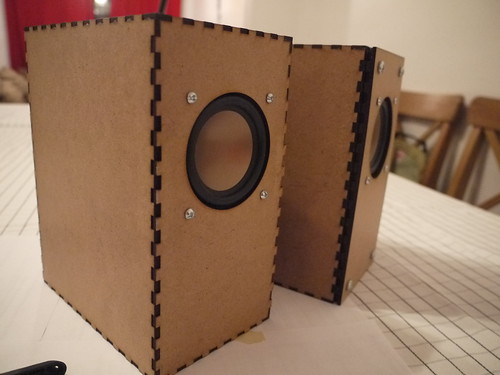
The t-nuts weren't ideal given the thickness of the panels, but with some glue and coaxing it worked. In the end, this design allowed the front baffle with the driver mounted to be screwed in. Here shows the version 1 (left) and version 2 (right) of the enclosure:

P1050259
Version 1 (left) shows a press-fit of the finger joint, and if I was building a one-off system simply gluing it would have worked but it would be a one-way trip!

The final version adds a bit of extra depth to the front, but allows the baffle to be removed for servicing. There is a slight gap since I recycled the old front baffle piece that had the finger joint edges. If I was to make a new version, I would simply cut out two non-jointed pieces (or even better: use thicker MDF if the cutter allows!). Below you can see the straight-cut piece with the old jointed piece glued underneath:

P1050257

All in all, it was a pretty fun project and good introduction to lasercutting. In terms of the sound while it is significantly improved over the plastic lunchbox design from before, I think it's still quite a bit aways from Zaph's original: no stuffing, box walls possibly too thin, weather stripping is most likely not as airtight as "speaker-grade" seals, and, perhaps most importantly - no crossover to block out the lower frequencies that the drivers would struggle to output anyway). However, powered by a lepai 2020a+ with signal fed by a small bluetooth adapter dongle, it makes a great kitchen/casual listening speaker with sound quality significantly better than off-the-shelf systems at much higher prices.

Here's a PDF of the lasercut outlines (for a real cut you may want to edit the line thickness to 0.1mm, change the colour etc to settings that your lasercutter requires). The design was done on 3 sheets of 30cm x 60cm 1/8" MDF that you can buy from Home Depot for a few bucks. (Thanks again Filipe for the materials+advice!) You'll need to make your own rear exit holes for the connector mounts of your choice: easiest is to just make two holes for banana plugs, which is what I did.

Could I have done this by hand? Sure. It would be a good practice of woodworking skills, and much easier to use thicker materials. However, there are certain things a lasercutter can do very well and for clumsy/lazy people like myself, this was a good excuse to play around and experiment.

Finally, a plug to Central Stamp for the accessible and quick turnaround laser cutting service!

Monday, February 23, 2015

What do you do when you get your 3D printer back online again? Use it to play music of course!
(and spend hours tweaking until a cube actually comes out as a cube...). A MIDI-gcode converter is responsible for converting MIDI notes into frequencies which are mapped to motor PWM signals. Kinda like the more impressive floppy drive organ

Overall I was surprised at how well it kept over time - I had some concerns over the wood warping. However, there were the typical calibration and bed leveling issues that make me wish I had invested in something with a metal chassis made of aluminum extrusions... Oh well, hope the Rhino 3d printer works out!